
HL7 Soup Online
HL7 Soup Online is the quickest way to look at an HL7 v2 message when you need an answer now: what type of message is this, which fields matter, what changed, and whether a sample is safe enough to send to someone else. The public hosted editor is best for demonstrations, support calls, vendor conversations, training, and non-sensitive test data.
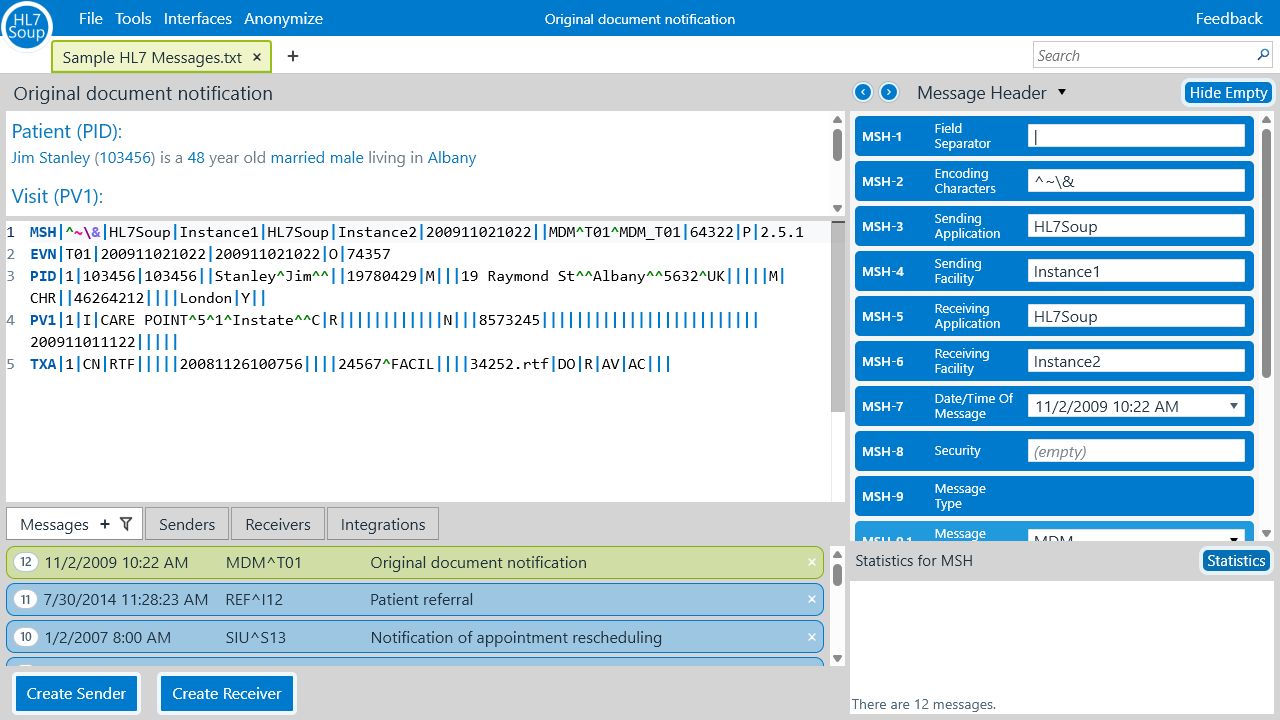
The important decision is where the work should run. For sample messages and quick review, the hosted browser version is convenient. For PHI, production messages, confidential files, large message sets, local lookup tables, network testing, or repeatable integration workflows, install or self-host HL7 Soup Web so the application and data stay under your controls.
Privacy note: do not paste or upload patient-identifiable, production, confidential, or regulated clinical data into the public hosted site unless your organization has explicitly approved that use. The installed and self-hosted options are designed for teams that need the browser experience while keeping clinical data on their own computer, server, or network. See the privacy policy or contact support if you need help choosing.
Use the hosted editor when
- You have a non-sensitive sample message and need a fast explanation.
- You are helping a vendor, tester, analyst, or colleague over a call.
- You want to demonstrate HL7 Soup without asking anyone to install software.
- You need a browser-based HL7 viewer from Windows, macOS, Linux, a tablet, or a phone.
- You are preparing examples for training, documentation, support, or a proof of concept.
Self-host or install when
- The message contains PHI, patient identifiers, production data, or regulated content.
- You need to open very large HL7 files or keep logs and test data locally.
- Your team has firewall, audit, backup, access-control, or security-review requirements.
- You want local data tables, country-specific lookups, or project-specific conformance rules.
- You need to send, receive, replay, or inspect HL7 traffic over MLLP/TCP or HTTP.
What the online editor helps you answer
A pipe-delimited HL7 message can be technically valid and still be difficult to explain. HL7 Soup is built around the practical questions that come up in support, testing, implementation, and interface design.
- Which message type, trigger event, patient, order, result, visit, or document is this?
- Which segment and field produced the value I am looking at?
- Why does this value fail an interface rule, date check, lookup table, or expected-value check?
- What changed between two similar messages?
- Can this message be anonymized into a safer example for support or training?
Turn useful samples into interface expectations
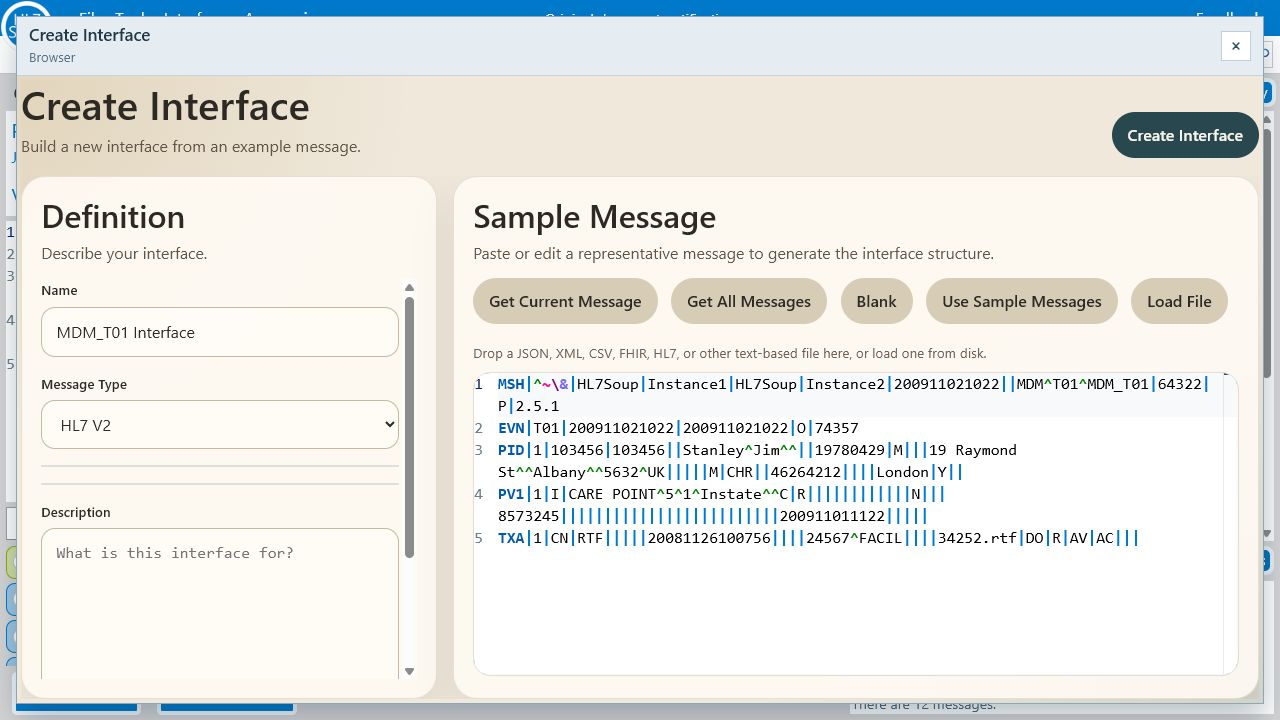
When a sample message represents the shape you expect from a sending system, HL7 Soup can help turn that sample into a reusable interface definition. That gives analysts, vendors, testers, and Integration Soup workflow designers a shared reference that stays close to the actual HL7 structure being exchanged.
Document what matters
- Name the interface in terms the project team will recognize.
- Keep the message type and structure attached to the definition.
- Record required fields, expected values, date rules, and table membership near the HL7 fields themselves.
- Use highlighting to make important fields visible during review.
Reuse the definition
- Share interface definitions between team members and environments.
- Review vendor samples against the same expectations used in testing.
- Keep message review and Integration Soup workflow design aligned when workflow licenses are in place.
- Use the same field expectations when looking at test results, logs, and message history.
Review faster without losing the raw HL7
HL7 Soup does not hide the message behind a pretty summary. The raw HL7 stays visible, but it is paired with a story view, segment table, field editor, search, validation, comparison, and anonymizing tools so you can move from question to evidence quickly.
- Interpretation: see the clinical or operational story while staying linked to the source fields.
- Validation: catch missing required values, invalid dates, table mismatches, and project-specific rule failures.
- Comparison: spot the meaningful differences between messages instead of scanning every delimiter by hand.
- Anonymizing: replace identifying content while preserving enough message shape for useful examples.
- Statistics: use installed or self-hosted mode when you need to summarize large message sets at speed.
Reference guidance where you are already looking
HL7 reference material is most useful when it is connected to the message in front of you. HL7 Soup links selected fields to practical notes about segments, data types, tables, message structures, and common integration traps, so the explanation is available while the raw value is still in view.
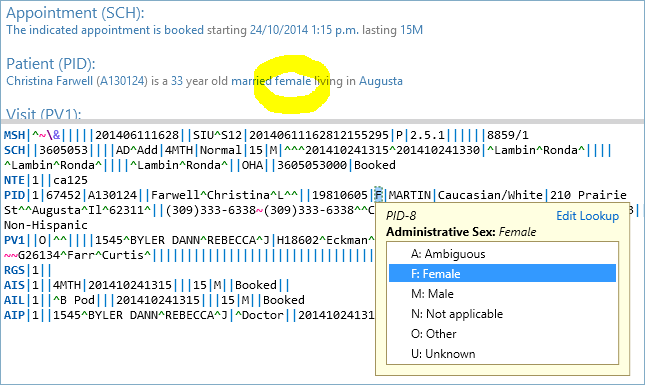
- Check what a field is for without leaving the message workspace.
- Use table and data-type notes to explain values during support and testing.
- Give analysts and vendors the same vocabulary when discussing a sample message.
- Move from parser-level validity toward "will the receiving workflow trust this?"
Why teams install or self-host HL7 Soup Web
The self-hosted product still gives you the browser-based HL7 Soup experience. The difference is ownership of the environment: the app, processing, files, logs, lookup tables, and test traffic can live on your workstation, server, or internal network.
The simple rule: if the data is real, sensitive, regulated, large, operationally important, or part of repeatable interface testing, run HL7 Soup where your organization already controls security, access, backups, and audit expectations.
Governed data and scale
- Keep PHI, production files, logs, and test messages inside your own environment.
- Use local or server-side processing for large files that are not practical in the public hosted app.
- Open and analyze very large HL7 message sets, including bulk files used in migration, testing, and audit work.
- Apply local, regional, country, or project-specific lookup tables and conformance rules.
Interface testing
- Send and receive HL7 over MLLP/TCP or HTTP during controlled interface tests.
- Inspect ACKs, timings, request/response content, and error details next to the messages being tested.
- Use TLS and client certificates where your connection policy requires them.
- Replay selected or filtered message sets when testing receivers and workflow behavior.
- Connect review work to separately licensed Integration Host workflows where those licenses are in place.
Quick chooser
- Open HL7 Soup Online for safe sample data, quick explanation, demonstrations, screenshots, and light browser-based review.
- Install or self-host HL7 Soup Web for PHI, patient-identifiable content, confidential files, bulk message processing, custom data tables, and controlled network testing.
- Add Integration Host workflow licensing when the job moves beyond message review into hosted production workflow orchestration, routing, monitoring, and operational control.
Prefer the installed desktop product? Download HL7 Soup here. Need policy details? Read the privacy policy.