
Validate HL7 messages and return JSON or an HL7 ACK
What this Extension Library provides
The Validate HL7 Transformer Extension Library adds two activities:
- Validate HL7 Message returns enriched, version-independent JSON for workflow decisions, logging, alerting and reporting.
- Validate HL7 Message to HL7 ACK returns a complete HL7 acknowledgement for automatic TCP error handling or an explicitly bound response.
Both activities execute a saved HL7 Soup validation profile against a typed HL7 activity message. Red invalid highlighters become validation errors. Other colours, including orange warnings, are not returned by this Extension Library.
The video explains how to create and manage the validation profiles. The guide below covers running them in an Integration Soup workflow and choosing the appropriate response activity.
Before you start
Install .NET Framework 4.8 or later and the Microsoft .NET 10 Runtime (x64). Setup checks these prerequisites before new installation or upgrade.
- Integration Soup installed on the machine that runs the workflow.
- A saved
.HL7SoupValidatorsprofile and its exact name. HL7 Soup is needed to create or edit profiles, but does not have to be installed on the production server. - An Integration Soup workflow that receives or creates an HL7 message. A typed HL7 activity message is preferred; HL7-formatted generic text can also be parsed by the activity.
- For automatic profile refresh, the Integration Soup service account has read and write/create permission in
C:\ProgramData\Popokey\SharedSettings\Validators. Delete permission enables automatic snapshot cleanup.
Download IntegrationSoup.ValidateHl7Transformer.msi
The Extension Library loads directly inside the Integration Host process. It does not use an out-of-process runner or require a change to the Integration Host executable.
Step-by-step setup
- Create or choose the validation profile. In HL7 Soup, use the Highlighters and Validation window to build a validation set for the interface, feed, application or message type.
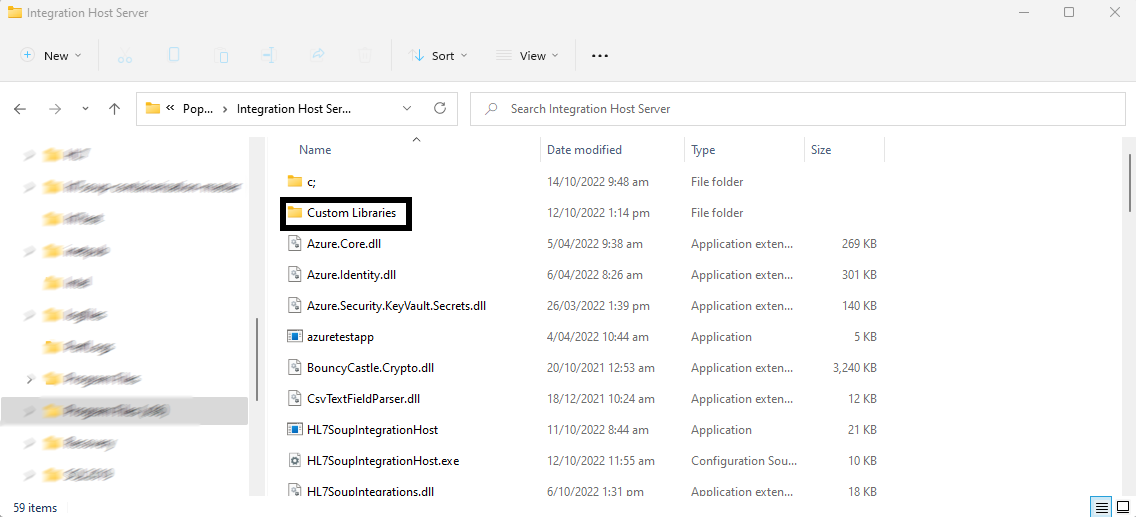
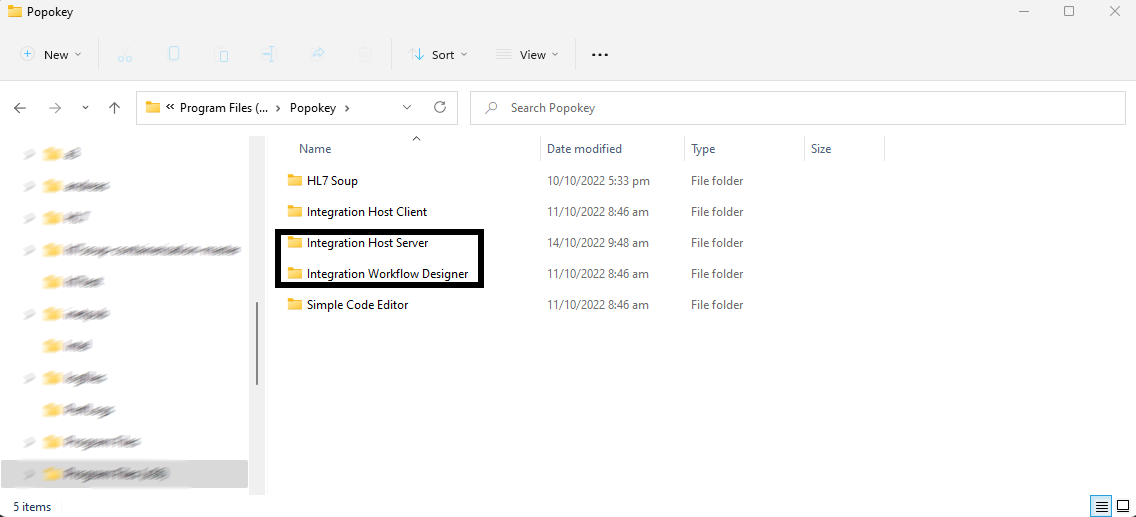
- Install the Extension Library. Run the MSI on the Integration Soup machine. The installer restarts a detected Integration Host service so it can load the upgraded DLL; reopen the Workflow Designer if the activities are not listed yet.
- Choose the response you need. Add Validate HL7 Message for JSON, or Validate HL7 Message to HL7 ACK for an acknowledgement message.
- Pass the HL7 message to the activity. In the activity message template, right-click and choose Insert Activity Message to preserve its HL7 type. If a bound message arrives as generic text, the activity reparses its HL7-formatted content; an empty activity input uses the workflow's received HL7 message.
- Set the Profile parameter. Enter the exact name of the saved profile, including spacing and capitalization.
- Choose the workflow behaviour. Leave Error if invalid cleared, which is the default, to return validation findings as data while the workflow continues normally. Select it when an invalid result should mark the workflow message as errored and take the receiver's error-response path. Its description is Mark Workflow Error on Invalid.
- Select the response. Read JSON fields in later activities. For TCP responses based on validation, use After All Processing. With Error if invalid cleared, use Return Response From Activity or a custom response bound to the ACK activity result. With it selected, automatic response handling returns an error response when validation fails.
- Test a passing and failing message. Confirm the JSON bindings or returned ACK before using the workflow in production.
Profile edits are detected automatically
The Extension Library checks the saved profile file whenever it validates a message. Changes saved in HL7 Soup are used by the next validation; the workflow and Integration Soup service do not need to restart.
To bypass the Integration Host's in-memory profile cache, the Extension Library content-hashes and loads a short-lived snapshot of each changed profile, then removes it. The Integration Soup service account needs write/create permission for refresh and delete permission for automatic cleanup. If snapshot creation is unavailable, normal validation can fall back to the host profile loader, but an edited profile may remain cached until the service restarts.
Activity 1: Validate HL7 Message
This activity returns JSON. The Path value retains the familiar HL7 Soup path, while the segment, occurrence, field, repetition, component and subcomponent are also returned separately for easy workflow binding.
{
  "Profile": "ADT A01 Validation",
  "HasErrors": true,
  "AcknowledgmentCode": "AE",
  "Errors": [
    {
      "Path": "MSH-15",
      "ErrorSegment": "MSH",
      "ErrorSegmentOccurrence": 1,
      "ErrorField": 15,
      "ErrorFieldRepetition": null,
      "ErrorComponent": null,
      "ErrorSubcomponent": null,
      "Reason": "is not in message",
      "Severity": "E",
      "Hl7ErrorCode": "101",
      "Hl7ErrorText": "Required field missing",
      "Hl7ErrorCodingSystem": "HL70357",
      "ApplicationErrorCode": "PROFILE_REQUIRED",
      "ApplicationErrorText": "Required by validation profile",
      "ApplicationErrorCodingSystem": "L"
    }
  ]
}
HasErrors is true when one or more errors are returned. AcknowledgmentCode is AA for a passing result and AE for a failing result. These fields always describe the validation outcome and do not depend on the Error if invalid checkbox. A successful result has an empty Errors array.
A path such as OBX[2]-5[3].2.1 is returned as segment OBX, segment occurrence 2, field 5, field repetition 3, component 2 and subcomponent 1.
Activity 2: Validate HL7 Message to HL7 ACK
This activity constructs the ACK header the same way as Integration Soup's automatic TCP response: it copies the incoming MSH, swaps the sending and receiving applications and facilities, changes the message type to ACK, and otherwise preserves the timestamp, control ID, processing ID, complete version field and later MSH fields. For HL7 v2.5 and later it also sets MSH-9.3 to ACK, adding that component when the incoming message type has only two components. The incoming MSH-10 is also placed in MSA-2.
The following v2.5 response shows two validation errors: a missing MSH-15 and a PID-8 value outside the permitted list. Each error has its own ERR segment. Select the message or the arrow to open the complete multiline ACK directly in HL7 Soup Web.
MSH|^~\&|ReceivingApp|ReceivingFacility|SendingApp|SendingFacility|20260720120000+1000||ACK^A01^ACK|MSG0001|P|2.5
MSA|AE|MSG0001|MSH-15: is not in message
ERR||MSH^1^15|101^Required field missing^HL70357|E|PROFILE_REQUIRED^Required by validation profile^L||Validation profile: ADT A01 Validation; Path: MSH-15; is not in message|MSH-15: is not in message
ERR||PID^1^8|103^Table value not found^HL70357|E|PROFILE_TABLE_VALUE^Value not permitted by validation profile^L||Validation profile: ADT A01 Validation; Path: PID-8; is not in list|PID-8: is not in list
A passing validation returns MSA-1=AA and has no ERR segment. A failing validation returns MSA-1=AE, places the first error summary in MSA-3, and includes all errors in the version-appropriate ERR representation.
How the HL7 version changes ERR
The activity preserves the version supplied in MSH-12 and uses MSH-12.1 to choose the error structure:
- HL7 v2.1 through v2.3: one ERR segment with repeating
ERR-1values containing segment, occurrence, field and standard error code. - HL7 v2.3.1 and v2.4: the richer legacy repeating
ERR-1field also carries a local application code and shortened path text. These versions have no dedicated severity, component, subcomponent, diagnostic or user-message fields. - HL7 v2.5 and later: one ERR segment per error. The activity populates
ERR-2–ERR-5andERR-7–ERR-8;ERR-6is left empty. - Missing or unrecognised version: the detailed legacy
ERR-1form is used.
The equivalent v2.4 response carries the same two errors as repetitions within the single legacy ERR-1 field:
MSH|^~\&|ReceivingApp|ReceivingFacility|SendingApp|SendingFacility|20260720120000+1000||ACK^A01^ACK|MSG0001|P|2.4
MSA|AE|MSG0001|MSH-15: is not in message
ERR|MSH^1^15^101&Required field missing&HL70357&PROFILE_REQUIRED&MSH-15: is not in&L~PID^1^8^103&Table value not found&HL70357&PROFILE_TABLE_VALUE&PID-8: is not in&L
The ~ between the two v2.4 error values is the repetition separator; both belong to ERR-1 in the same ERR segment. The JSON activity provides the full structured detail independently of the sender's version.
Standard and application error codes
101for a required field missing.102for invalid formatting, dates, lengths, case and general profile-rule failures.103for a value outside a table or permitted list.200and201for unsupported message type and trigger event values atMSH-9.1andMSH-9.2.202and203for unsupported processing and version IDs atMSH-11andMSH-12.
The local application codes, such as PROFILE_REQUIRED, preserve why the selected validation profile rejected the value.
Choosing workflow and TCP response behaviour
A validation finding is part of the activity result, rather than an execution failure. When the profile runs and the JSON or ACK is produced, the validation activity has completed successfully even when the result contains HasErrors=true or MSA-1=AE. Its activity row therefore records successful completion, while the result and its error details remain available in the activity response and logs.
Both activities include an optional Error if invalid checkbox, cleared by default, with the description Mark Workflow Error on Invalid:
- Cleared: validation findings are returned as data and the workflow continues normally. Automatic TCP response handling therefore follows its normal success path, usually returning an application accept. Bind
HasErrors,AcknowledgmentCodeorMSA-1in later workflow logic. To return the validation ACK instead, choose Return Response From Activity or bind the ACK activity result into a Custom Response. - Selected: an invalid result still populates the activity's JSON or ACK response, and also marks the current workflow message as errored with the first validation path and reason. With response timing set to After All Processing, automatic TCP handling returns an error response. Validate HL7 Message to HL7 ACK also makes its detailed
AE/ERRACK the workflow response; the JSON activity leaves the receiver to generate its normal workflow-error response.
Selecting the checkbox marks the workflow message as errored without interrupting downstream workflow activities, so the TCP listener remains available for the next message. Configuration and execution failures still throw, including a blank or missing profile, a missing profile file, input that cannot be interpreted as HL7, unrecoverable profile access, or a missing MSH when creating an ACK.
For explicit workflow logic: leave Error if invalid cleared and bind the activity result into later workflow conditions or transformers. A workflow can return the bound ACK as its custom TCP response, route or quarantine the message, or use its own conditional code transformer to throw an exception when the bound result indicates an invalid message. A deliberate transformer exception uses the workflow's normal exception-response handling, so configure and test that response path separately.
Getting modern detail from an older message
The JSON activity is the simplest way to obtain severity, component-level location and application-code detail from v2.3.1 or v2.4 input.
If a workflow specifically needs modern ERR bindings, validate twice: validate the untouched original-version message to produce the external ACK, and validate a copy whose version is changed to HL7 v2.5 or v2.5.1 for internal modern ERR processing. Changing only the generated ACK's version back does not convert its ERR structure and would produce an invalid older-version ACK.
Useful checks and troubleshooting
- The activity cannot find the profile: confirm the Profile parameter exactly matches the saved HL7 Soup validation set name.
- A profile edit is not picked up: confirm HL7 Soup saved the profile and that the Integration Soup service account can read and write/create files in the Validators folder. Add delete permission to clean up temporary aliases automatically.
- The message cannot be read: insert the earlier typed HL7 activity message where possible, or confirm that a generic bound value still contains a complete HL7-formatted message.
- The activities are not in the designer: restart the Integration Soup service after installing the MSI and confirm it was installed on the workflow machine.
- The returned ACK has no ERR details: use After All Processing. Either select Error if invalid and use automatic response handling, choose Return Response From Activity with the ACK activity, or bind the ACK activity result as the receiver's Custom Response.
Related tutorials and downloads
- Validate, highlight, and compare HL7 messages
- Integration Host Getting Started Part One
- Mastering the Integration Host Workflow Designer
- Extension Library Directory
- Download HL7 Soup and Integration Soup
Video Transcript
This transcript accompanies the validation-profile video above, which shows how to create and manage the HL7 Soup validation sets that these activities run.
Read the full transcript
Hello, and welcome to this tutorial where we look at how to validate, highlight, and compare your HL7 messages.
I'm going to start by loading HL7 Soup. We see here that it comes with a list of sample messages, and these are what I will use to demonstrate the features.
Let's start with the basics and look at how we can highlight a particular field in every message. For argument's sake, I will set my patient's last name to always highlight as green so I can easily find it. I'll quickly click in the interpretations window to find the last name, and now I can right-click and select to highlight the last name, PID-5.1, green whenever the field is in the message.
Now you can see that this field is highlighted green, and it shows that way for every message I have going forward. This makes it much easier to find.
You probably noticed, however, that the rules extend beyond just checking for its existence. If I go back to the highlights menu, I can select other options, like equaling or containing a certain value, or when it actually has any value. I can also go to the Not indicator and highlight where it is not a certain value or does not have a value.
If I highlight a date field, I get options that are more suitable to date values, such as greater than or less than. I can, for instance, highlight this date orange when it is older than 2014. This might be when a system change took place, and the orange can warn me of a risk.
Notice if I change this date, it only highlights when the date is older than 2014.
The red color highlight has been given additional functionality. It is reserved for invalid values, those that deserve special attention. One bug I find frequently with HL7 messages is invalid dates. It is surprisingly difficult to spot this issue without highlighters. Let's add a red invalid highlighter to this date field.
Now notice as I change this date's value to an invalid month, we see it instantly highlights it red, but it goes further and adds an error message to the interpretations window, and also highlights any other currently loaded messages that have the same problem.
If I right-click on my messages list, I can create a filter that shows only valid or invalid messages, so I can work through them and find my issues.
By the way, HL7 Soup has validations out of the box that check for invalid dates on the most popular HL7 message types.
Another popular highlighter shows when your fields need to have values that are in the lookup tables. Let me show you by marking any administrative sex fields, PID-8, invalid if they are not found in the data table. See how HL7 Soup instantly highlights all the messages and also gives a detailed description of what is wrong.
So now that we have some highlighters, let's see what can be done to manage these.
Navigate up to the Highlighters and Validation window, and we can see the list of current highlighters. From here we can change any of the existing highlighters we have made, including the ability to change the values to anything that we like, values that were not in the original message. We can even add custom text that will show in the field's tooltip or in the invalid message description.
Something I find extremely helpful is the ability to create different sets of validation. To clone an existing set, I simply click the plus button and give the new set a new name. This allows me to create rules specifically for a certain customer or application, then easily jump back and forth between them.
Perhaps most importantly of all, I can even export these validation sets to my colleagues or customers so they can take advantage of them. Imagine being able to create validation rules that ensure messages will work with a certain integration, and then allow others to use this. Your customers or suppliers could be given the set and have the chance to make sure their messages conform before you even get them.
From the management window, we can also generate a bulk list of highlighters from the existing message. This allows us to rapidly build large sets. For instance, let's validate all invalid dates and data tables.
If I go back to the sample messages, we can see that they all have lots of errors. This is because the samples come from real-world examples that did not often conform to the data tables. However, because of the highlighting, it is very easy to go through and fix these as required.
Now I'm going to create a new highlight set, clear out all highlighters, and show off some of the other generation features.
Firstly, there is the Does Not Exist highlighter. Once generated from an existing message, this will make sure that all other messages have the same segments and fields as a minimum. The fields do not need values, but they must at least be in the message. It simply creates a filter for the last field in each segment that ensures it is there.
Then we have the Value Is Empty highlighter. This scans the current message, looking through all fields and components. If they have a value in this message, then a highlighter will be created that suggests they need to be in other messages too. Fields missing from the current message do not have to be in other messages.
Finally, we have the Value Is Different highlighter, or simply the message comparer. It creates a highlighter for every field and component and checks that it has the same value. I can now take two messages and see exactly how they differ. I can even generate this from the second message so it highlights both ways. Very helpful when you are looking for subtle differences between messages.
Don't forget that HL7 Soup comes with a free 30 day trial, particularly helpful if you'd like your customers or suppliers to use your validation rules on their messages without cost.
You can download HL7 Soup by Googling HL7 Soup and clicking on the free trial.
Also, if you have found my videos have helped you, then please click like or subscribe to the series so YouTube can inform you when more tutorials are released.
Comments and suggestions for future videos are very welcome.