
HL7 Segment Groups
HL7 v2 messages look flat because the wire format is just one segment after another. That is the trick. The message structure is not flat. A repeated OBX may belong to the current OBR. An IN2 may belong to the previous IN1. A scheduling resource segment may belong to the current RGS group. You only know that by reading the surrounding message structure and tracking where you are.
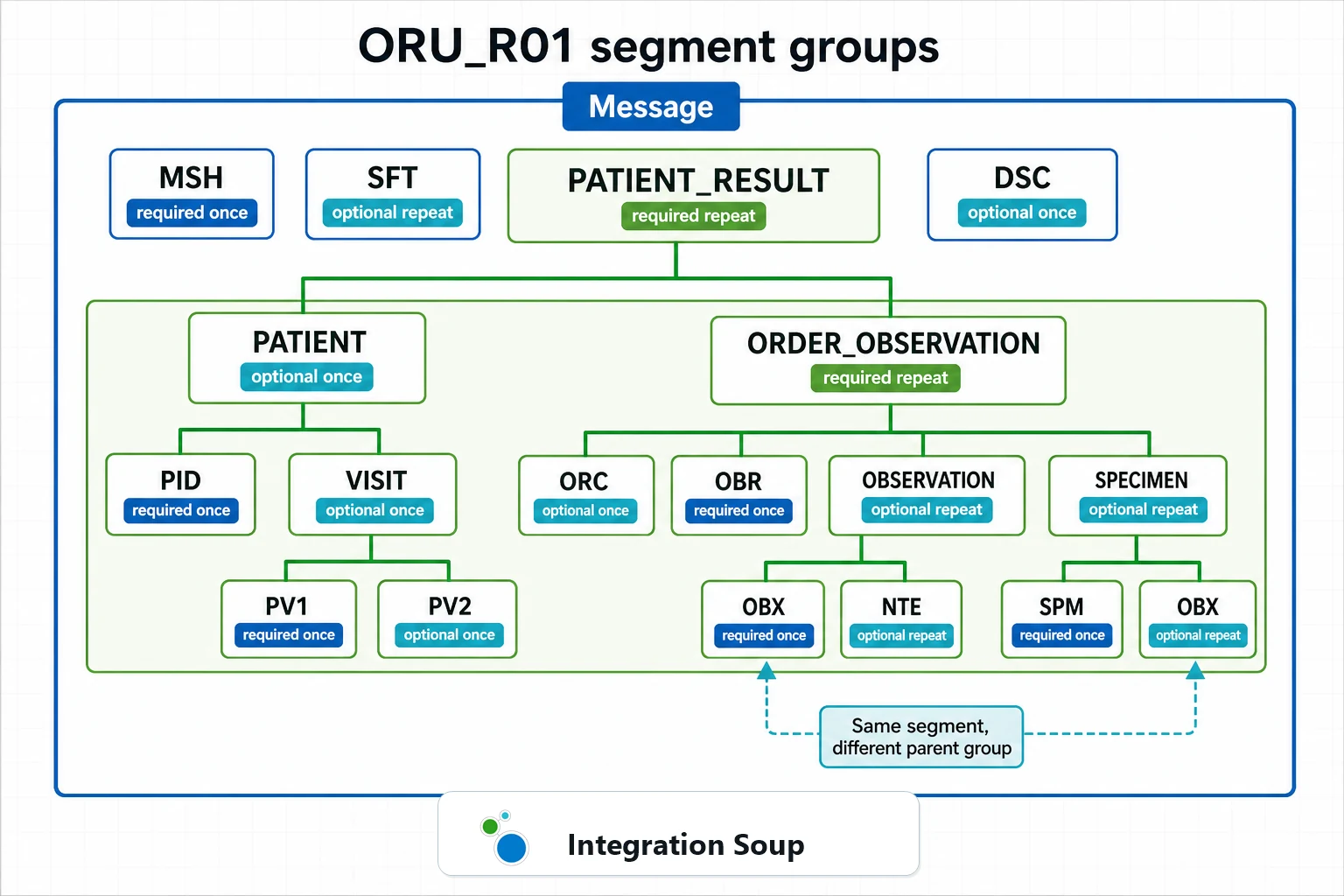
That is powerful, but I do not find it especially convenient. A field path such as OBX-5 tells you the field inside an OBX segment. It does not tell you which order group, specimen group, patient group, or schedule resource group that OBX belongs to. To answer that, your parser, transformer, or support person has to keep enough context to know the current group.
What segment groups are
The HL7 standard allows two or more segments to be organized as a logical segment group. A group may be required or optional, and it may repeat or appear only once. In the structure notation you will often see that expressed with square brackets for optional material and braces for repeating material.
A simple mental model is:
That last row is where the design starts to bite. The OBX segment is still just OBX. Its meaning changes because of its position inside the current OBR-led group.
Why position matters
In a simple ADT message, PID and PV1 are usually easy to reason about. You can often say "use PID-3 for the patient identifier" or "use PV1-19 for the visit number" and be understood.
In a result message such as ORU_R01, that is not enough. OBR-4 describes the ordered or reported service. The OBX segments that follow may be individual values in that panel or document. If the message has two OBR groups, the third OBX in the message is not merely "OBX number three"; it is an observation inside whichever OBR group was current when that OBX appeared.
The same pattern appears in other families:
The inconvenient part
The awkwardness is that HL7 field references are local to a segment. OBX-5 is a valid field reference, but it is not a complete business location. "The first OBX-5 after the second OBR" might be enough for a human conversation, but software needs a repeat-aware path or a group-aware loop.
This is why fragile mappings often work in testing and then fail in production. The first sample has one OBR and two OBXs, so a flat map appears correct. Then microbiology sends several organisms, pathology sends narrative sections, or a lab panel sends multiple OBR groups. Suddenly "take OBX-5" becomes "which OBX-5, under which order, under which patient, under which specimen?"
I would have preferred a structure where every field reference could carry its group identity more naturally. HL7 v2 did not choose that shape. It chose a compact stream of segments whose hierarchy is implied by order. So good HL7 tooling has to make that implied structure visible.
Do not flatten groups by accident
The most common implementation mistake is treating the segment name as if it were the whole address. If a message can repeat an order group, mapping OBX-5 to one destination column without a repeat rule silently chooses one value and loses the rest. If a message can repeat insurance groups, mapping the first IN1 may ignore the secondary coverage that caused the billing problem.
A better mapping asks three questions before touching the field:
For lab results, that might mean one output row per OBX with patient, visit, order, specimen, and observation fields copied into each row. For scheduling, it might mean one appointment with several resource rows. For ADT insurance, it might mean one patient/visit update with multiple coverage records.
How HL7 Soup Web helps
When you are reading a single message, HL7 Soup Web helps by turning the raw segment stream back into something a human can inspect. It is much easier to discuss an OBR/OBX block, a PID/PV1 visit context, or an RGS resource group when the message is highlighted and the segment and field names are visible.
That matters during support. If someone says "the OBX is wrong," open the sample and ask which group it belongs to. Is it under the expected OBR? Did a specimen group appear before it? Did the sender repeat the group when the receiver expected a single panel? A visual tool does not change the HL7 standard, but it reduces the amount of group state you have to hold in your head at once.
The Understanding HL7 Message Structure tutorial is a good companion for this because it teaches the segment, field, component, subcomponent, and repeat layers before you get into full message groups. The MSH-9 and message types reference then shows how the message structure component helps validation software know which segment layout to expect.
How Integration Soup helps
In Integration Soup, the important habit is to bind loops to the repeated thing, not to a label that merely looks right. A For Each over the real repeated OBX collection is different from a transformer that always reads the first visible OBX. The same idea applies to FT1 charge lines, SIU resource groups, repeated patient groups, or repeated insurance records.
The repeating OBX to CSV tutorial demonstrates the pattern clearly: patient values are shared context, while the OBX value belongs inside the loop. The HL7 to JSON tutorial uses the same idea when one HL7 result message becomes a JSON document with an array of observations. The Workflow Designer tutorial also explains how the For Each and Next transformers make bindings inside the loop refer to the current repeated item.
That is the practical answer to the inconvenience of HL7 grouping: do not pretend the hierarchy is not there. Make the loop visible, name the variables after the business object they represent, and log enough context that support can see which group was being processed when something failed.
Group-aware debugging
When a group-sensitive interface fails, I would debug in this order:
For a broader troubleshooting routine, see Debugging HL7 by workflow. For mapping habits, see HL7 for interface-engine transformations and HL7 for lab and pathology results.
Rule of thumb
If the segment can repeat, ask what owns the repeat. If the group can repeat, ask what identifies each group. If the destination is flatter than HL7, choose the output grain deliberately. One row per message, one row per order, one row per observation, and one row per resource are very different interfaces even when they all start with the same raw HL7 file.
Segment groups are not my favorite part of HL7 v2, but they are not optional knowledge. They are how the standard represents hierarchy inside a line-oriented message. Once you accept that, the job becomes less about memorizing every segment and more about making the current group visible in your tools, mappings, tests, and logs.