
HL7 message types and MSH-9 event codes
What this tutorial explains
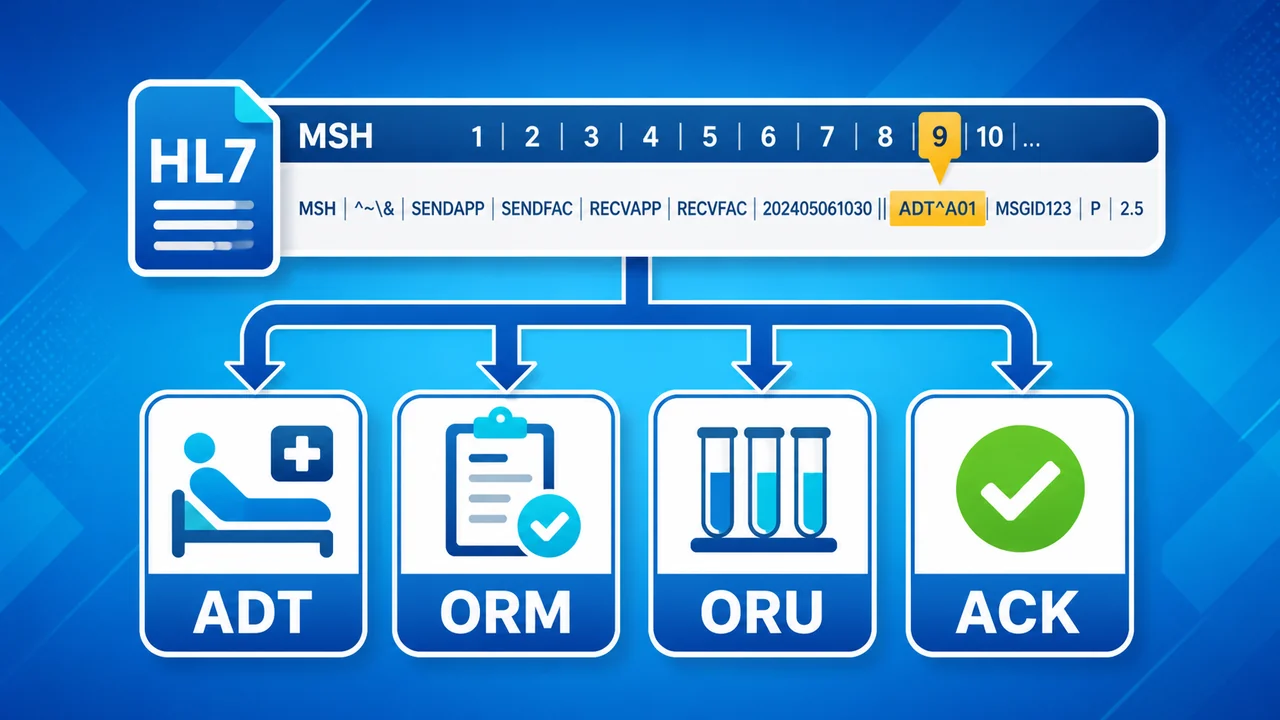
The third lesson in the HL7 tutorial series focuses on the message type field in the HL7 message header: MSH-9. This is the field that tells you whether a message is an admission, an order, an observation result, a scheduling update, a document notification, or another kind of HL7 event.
Message type codes are short because they are designed for systems to process, not for people to read casually. A message may say ADT^A04, while HL7 Soup shows the friendlier description Register a patient. This tutorial connects those two views so the code makes practical sense.
Why message types matter
HL7 is used across many parts of healthcare, so one integration may receive messages about patient registration, orders, results, documents, appointments, referrals, and more. The message type gives you the first reliable clue about what the message is trying to do.
It is also one of the simplest fields to use when routing or filtering messages. If an application only cares about observation results, for example, it can look for ORU messages. If it only cares about new patient registrations, it can look for ADT^A04.
MSH-9 in three parts
MSH-9 can contain up to three components. The first two are the parts you will use most often. The third one is there for validation and structure reuse, which is useful but can look odd until you know what it means.
| Component | Example | Meaning | How to read it |
|---|---|---|---|
MSH-9.1 |
ADT |
Message code | The broad message family. ADT stands for Admission, Discharge, and Transfer, though most HL7 people simply call it ADT. |
MSH-9.2 |
A04 |
Event type | The specific event within that family. In this tutorial, A04 means the message is registering a patient. |
MSH-9.3 |
ADT_A01 |
Message structure | The structural schema used to validate the message. An ADT^A04^ADT_A01 message is still an A04 event, but it shares the ADT_A01 structure. |
Practical read: when you see ADT^A04^ADT_A01, treat the event as A04. The final ADT_A01 component tells validation software which message structure the event follows.
Using HL7 Soup to find the meaning
If you are new to HL7, you do not have to memorize every message and event code. In HL7 Soup, right-click the Message Type header to jump straight to MSH-9, then use the drop-downs to see the supported values and descriptions.
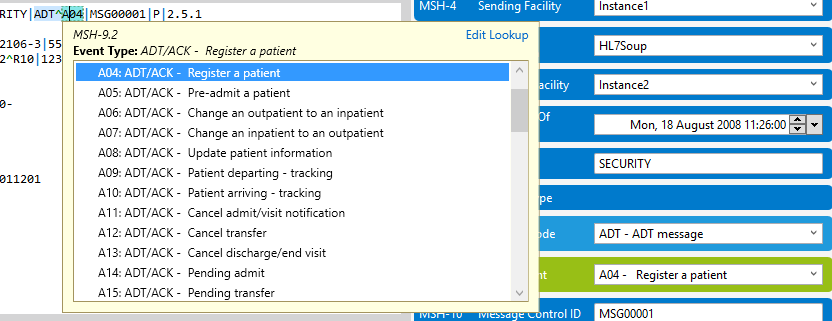
MSH-9.1 is set, MSH-9.2 shows event choices for that message family.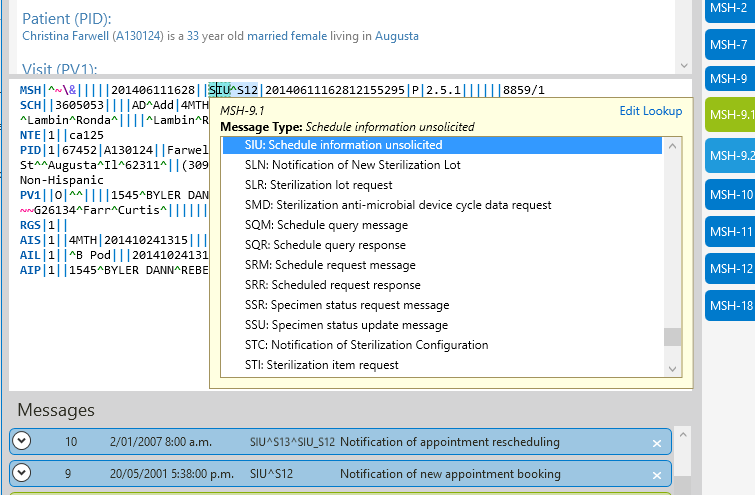
How to approach an unfamiliar HL7 message type
- Start at
MSH-9. This is where the message identifies what kind of event it represents. - Read
MSH-9.1as the family. Codes such asADT,ORU,ORM,SIU, andMDMgive you the broad category. - Read
MSH-9.2as the real action. This is where an ADT message becomes a patient registration, transfer, cancel, update, or another event. - Do not let
MSH-9.3confuse the event. If it is present, it describes the structure used for validation. It does not replace the event code. - Check
MSH-12when validating. Message structure and HL7 version work together when software decides whether a message is well formed.
Message structure versus event type
The confusing example in this tutorial is ADT^A04^ADT_A01. At first glance it looks like the message might be both A04 and A01. It is not. The event is still A04, which means register a patient.
The reason ADT_A01 appears as the third component is that several ADT events have the same segment requirements. Instead of defining the same structure again and again, HL7 can reuse a shared structure. That reduces the number of schema definitions and gives validation software a consistent target.
In HL7 Soup, clicking the message type name lets you inspect the segment structure for the current message. You can see which segments are required, which are optional, and which may repeat. For example, a patient registration message requires a patient details section, while next-of-kin or insurance details may be optional or repeatable depending on the structure.
Useful checks
- Filtering messages: use
MSH-9.1for broad routing, andMSH-9.2when you need the exact event. - Reading ADT messages: remember that ADT stands for Admission, Discharge, and Transfer, but the event code usually tells you the practical action.
- Validating messages: check the message structure in
MSH-9.3and the HL7 version inMSH-12. - Searching for the right code: use the HL7 Soup drop-downs or segment grid rather than guessing from memory.
- Explaining a message to someone else: translate the code into the readable event, such as
ADT^A04means register a patient.
Related tutorials
- Part 1: What is HL7?
- Part 2: Understanding HL7 Message Structure
- HL7 segment guide from experience
- HL7 message headers from experience
- HL7 message acknowledgment from experience
- HL7 event type from experience
- HL7 patient identification from experience
- HL7 patient additional demographic from experience
- HL7 next of kin from experience
- HL7 patient visit from experience
- HL7 patient allergy information from experience
- HL7 patient adverse reaction information from experience
- HL7 diagnosis from experience
- HL7 insurance from experience
- HL7 insurance additional information from experience
- HL7 guarantor from experience
- HL7 financial transaction from experience
- HL7 common order from experience
- HL7 timing/quantity from experience
- HL7 timing/quantity relationship from experience
- HL7 observation request from experience
- HL7 specimen from experience
- HL7 observation result from experience
- HL7 transcription document header from experience
- HL7 notes and comments from experience
- HL7 scheduling activity from experience
- Scheduling over HL7 from experience
- Validate, highlight, and compare HL7 messages
- Return to the HL7 tutorial directory
Download 30 Day Free Trial of HL7 Soup
Video Transcript
Read the full transcript
Hello and welcome to this third video in the series of HL7 messaging tutorials, where we focus on HL7 message types of the MSH-9.
Because HL7 is designed to work with many different sectors of the medical software industry, it is not surprising that different types of messages are needed to express different collections of information. The message type is critical for filtering out messages that are not relevant to a particular application.
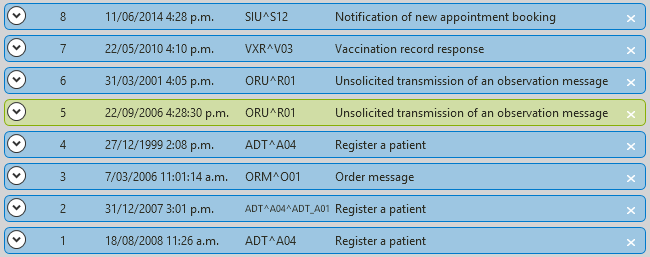
If we take a look in the HL7 Soup sample messages, we see an indication of what each message is about. Headings like "Document notification", "Patient referral", and "Register a patient" clearly indicate the intended use of this message. But how does HL7 Soup know this? More importantly, how can you know this when looking at a message?
Well, it is always at the same place: MSH-9. After working with HL7 for a while you will find it easy to spot, but if you are new to it, you can always right-click on the Message Type header and you will be taken straight to it.
One of the first things you are going to notice is that even though HL7 Soup tells you this message is for registering a patient, the actual HL7 message says no such thing. Instead the more computer-friendly ADT^A04 code is written in the message.
Fortunately, HL7 Soup provides you with a convenient drop-down to help you out. Scrolling through this list gives you a directory of every message type that HL7 supports.
It is worth noting, though, that I am only scrolling through the first component of the MSH-9. This is just the ADT section, not the A04 part.
A quick side note: unlike most HL7 message types, the description of an ADT message is not particularly intuitive. It actually stands for "Admission, Discharge, and Transfer", but everyone who works with HL7 just calls it ADT.
Setting the first component helps to filter what is available for the second component, the MSH-9.2, the event type. Here is the real nitty-gritty of what this message is doing. The A04 is the specific part of the message that says to register a patient. So we see that the MSH-9.2 description is actually what HL7 Soup uses to represent the message.
What the MSH-9.1 component has done for us is provide a filter so that we only see ADT type events in this drop-down. All of the event types that we see here are just for the ADT message type. You can optionally use the segments grid on the right to view the full list of MSH-9.2 in its entirety. As you can see, this is quite a large and comprehensive list. Searching through this list can be a very effective technique for finding message types that suit your needs.
You may have noticed that some of the sample messages have message type codes that are longer than others. Ones such as ADT^A04^ADT_A01 have a third component section, the MSH-9.3, that seems to add nothing to the message type other than confusion. Is this message's event type A04, or is it an A01?
The answer is quite simply that it is an A04, but the message structure is the same as an A01. The message structure, along with the message version in MSH-12, enables computer software to validate that the message conforms to a particular structure and can prevent poorly formed HL7 messages being processed by the system.
Because many of the A0x messages have exactly the same composition requirements, the MSH-9.3 creates a way of reducing the required schema definition size by allowing different message types to share identical structure.
In order to see the message structure for the current message, just click on the message type name. Here you can see every segment type that is valid for this type of message. You can see, for instance, that this message requires exactly one PID, or Patient details section, but could have zero or more NK1, or Next of Kin details.
You can also see that some segments come in groups. For instance, the IN1, or insurance details, could also be supplemented with an IN2, IN3, and a ROL segment providing additional details.
It is also worth noting that a short description for each of the segments is available if you mouse over the segment code.
Remember, you can download a free 30-day trial of HL7 Soup from www.integrationsoup.com, which will help you through this tutorial series.
If these tutorials have helped you, then please do me a favor and click like. You can also subscribe to this channel so you are notified as soon as new ones come out.
Comments are always welcome. I'll have new videos coming out shortly. Why not send me a message and let me know what you would like my next one to be?